Watchlist Exclusions
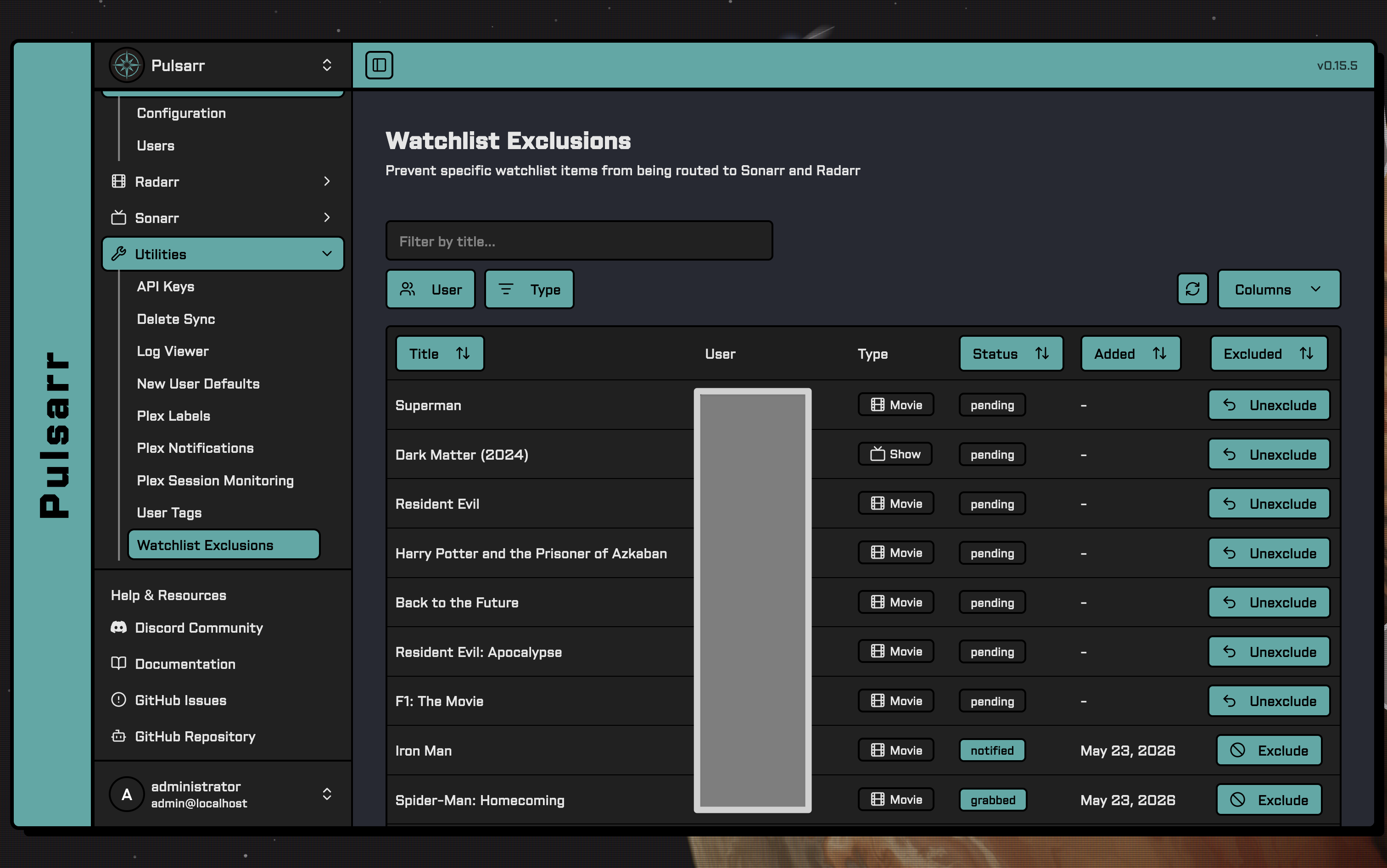
Prevent specific watchlist items from being routed to Sonarr and Radarr, allowing you to control which content gets added to your library.
Quick Setup
- Navigate to Utilities → Watchlist Exclusions
- Find the item you want to exclude using search or filters
- Click Exclude on the item to block it from being added to Sonarr/Radarr
- Click Unexclude to unblock it
How It Works
When a user adds something to their Plex watchlist, the sync engine normally routes it to Sonarr or Radarr. An exclusion is a per-user veto on that routing for a specific item — the sync engine sees the item, checks for an exclusion, and skips it if one exists.
Common reasons to use this:
- You don't want a title auto-requested even though a user has it watchlisted (e.g. content you've chosen not to host)
- Prevent re-request loops after Delete Sync — when content is removed but stays on a user's watchlist, an exclusion stops the next sync from re-requesting it
Exclusions clear automatically when the user removes the item from their Plex watchlist, so re-adding it later works normally.
Excluded items are treated as unwatchlisted by Delete Sync. If you exclude something that's already in Sonarr/Radarr, the next Delete Sync run will remove it from your library. Exclusion-driven deletion only triggers once every watchlister of an item is excluded - which is exactly the state the Maintainerr integration creates when it excludes current watchlisters.
Maintainerr Integration
Automatically create exclusions when Maintainerr deletes media, so stale watchlist entries don't re-request content Maintainerr just removed.
Quick Setup
- Navigate to Utilities → Watchlist Exclusions
- Enter your Maintainerr URL in the Maintainerr Integration section and click Save Changes
- Click Enable
Requires Maintainerr 3.23.0 or later, and Pulsarr must be reachable from Maintainerr.
How It Works
Without this integration, media Maintainerr deletes can stay on users' Plex watchlists, get re-requested by the next sync, and be deleted again by Maintainerr - a churn loop. With it enabled, Maintainerr notifies Pulsarr whenever it handles media, and Pulsarr writes exclusions so the sync never re-requests it.
Pulsarr configures Maintainerr itself: it creates a webhook notification agent named "Pulsarr" in your Maintainerr instance and connects it to your rule groups. Only rule groups whose collections delete media are connected - Maintainerr's webhook doesn't say which action ran, so unmonitor-only groups are left unconnected to avoid excluding media that still exists.
When using this integration, we recommend disabling Delete Sync and configuring your removal policies in Maintainerr instead. This feature ensures items Maintainerr deems fit for removal stay removed - they won't be re-added by stale watchlists - so running both removal systems is redundant and makes it harder to reason about why content disappeared.
Configuration
| Setting | Description |
|---|---|
| Maintainerr URL | Base URL of your Maintainerr instance (e.g. http://localhost:6246) |
| Exclusion Mode | Current watchlisters: exclude only users who have the item watchlisted now - anyone adding it later requests it fresh. Global: block the item for everyone until the exclusion is removed |
Sync Behavior
| Action | Description |
|---|---|
| On save/enable | Reconciles the Maintainerr configuration immediately |
| Scheduled | The maintainerr-sync job re-checks hourly, connecting any new rule groups |
| Sync Now | Manual immediate reconcile |
Each sync verifies the Maintainerr version, provisions the webhook config, updates rule group connections, and fires a test notification to confirm the round trip. The section's status indicator reflects the last result.
Manual Setup
If you'd rather not give Pulsarr your Maintainerr URL, configure the webhook in Maintainerr yourself:
- Set the
maintainerrWebhookSecretenvironment variable in Pulsarr (the auto-generated secret has no UI surface, so you need to set one you know) - In Maintainerr, create a Webhook notification agent with URL
http://your-pulsarr:3003/v1/notifications/webhook/maintainerrand the secret as the auth header - Set the JSON payload to include
"notification_type": "{{notification_type}}" - Enable only the Media Handled notification type
- Connect the agent to each rule group whose collection deletes media, and repeat for rule groups you add later
Page Features
The Watchlist Exclusions page shows all users' watchlist items in a sortable, filterable table:
| Feature | Description |
|---|---|
| Search | Filter items by title |
| User Filter | Show items for specific users |
| Type Filter | Filter by Movie or Show |
| Status Filter | Filter by watchlist status (Pending, Requested, Grabbed, Notified) |
| Excluded Filter | Show only excluded or only non-excluded items |
| Sorting | Sort by title, status, or date added (default: newest first) |
Filters and sorting persist across visits.
Best Practices
- Prefer excluding over asking users to remove items from their watchlists — the exclusion approach lets the item stay watchlisted (so they can still see it in Plex) without triggering a request
- Manual exclusions are per-user. If you want to block something across everyone, you'll need to exclude it for each user (the Maintainerr integration's
Globalmode does this automatically for handled media)
Troubleshooting
| Problem | Solution |
|---|---|
| Item still being requested | Verify the exclusion exists for the correct user; check sync engine logs |
| Exclusion disappeared | User likely removed the item from their Plex watchlist, which clears exclusions automatically |
| Item not showing in table | Item may not be on any user's watchlist; check Plex watchlist status |
| Maintainerr status shows failed | Verify the URL is reachable from Pulsarr and Maintainerr is 3.23.0+; check the error in the status section |
| No exclusions after Maintainerr deletes | Confirm the integration is enabled and the rule group's collection uses a delete action - unmonitor-only groups are deliberately not connected |
API Reference
See the Watchlist Exclusions API documentation for detailed endpoint information.